We use cookies and other tracking technologies to improve your browsing experience on our website, to show you personalized content and targeted ads, to analyze our website traffic, and to understand where our visitors are coming from.
⚠️
GDPR & Cookie Policy Notice
In accordance with data protection regulations; the use of mandatory cookies is required for the core functions of our website to operate, ensure data security, and perform analytics. If you reject the use of cookies, it is not possible to benefit from the services on our website due to technical limitations and data synchronization interruptions. You must consent to the use of cookies to access the content on our site.
Software Development with Python — A Comprehensive Technical Guide from Beginner to Expert
Python, published by Guido van Rossum in 1991, has become one of the most widely used programming languages in the world today. It consistently ranks in the top three on the TIOBE index; it is the de facto industry standard in diverse fields such as data science, web development, automation, and artificial intelligence. It is appropriate to start with the syntax that provides this popularity: Python has a readable structure close to English. However, this simplicity does not hide the power underlying the language. Integration with C extensions, support for asynchronous programming, an extensive standard library, and a massive ecosystem—all of these make Python a truly multi-layered language.
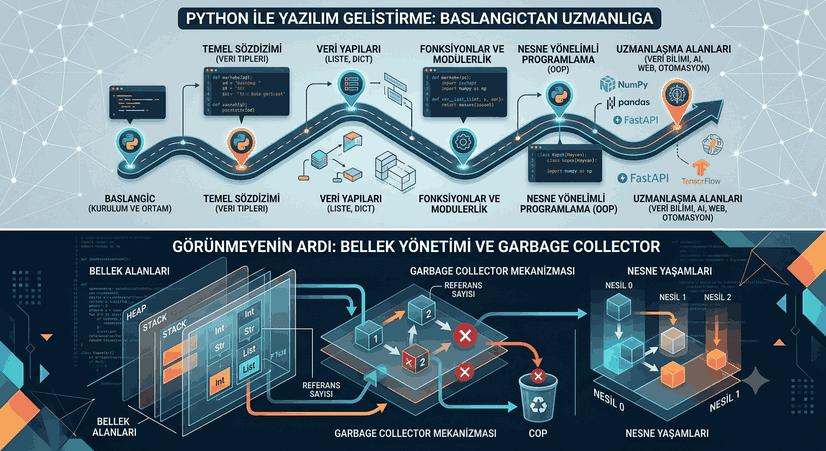
Figure 1: Software Development with Python — A Comprehensive Technical Guide from Beginner to Expert
Section 1 — Setup, Environment, and First Steps
Python Version Management
You can download Python directly from python.org. However, in professional use, working with multiple Python versions becomes mandatory. The pyenv tool is extremely useful for this:
# pyenv installation (Linux/macOS)curl https://pyenv.run | bash
# List available Python versionspyenv install --list
# Install a specific versionpyenv install 3.12.3
# Set global versionpyenv global 3.12.3
# Set project-specific versionpyenv local 3.11.8
For Windows users, the pyenv-win package serves the same function.
Virtual Environment Management
Every project should carry its dependencies in an isolated environment. Python’s built-in venv module is sufficient for this task:
For more advanced dependency management, poetry or uv can be preferred. uv, written in Rust, stands out as an extremely fast package manager:
# uv installationpip install uv
# Create a new projectuv init myproject
cd myproject
# Add packagesuv add requests pandas
# Run the projectuv run python main.py
IDE Selection
VS Code is a common choice due to its lightweight and extensible nature. When the Python extension, Pylance language server, and Jupyter notebook support are used together, a powerful environment is created.
PyCharm is a full-featured IDE. It comes integrated with code completion, debugging, refactoring tools, and project management.
Jupyter Notebook / JupyterLab is indispensable, especially for data analysis and research-oriented work. Its cell-based execution model is ideal for step-by-step exploration:
pip install jupyterlab
jupyter lab
Section 2 — Basic Syntax and Data Types
Variables and Dynamic Typing
Python is a dynamically typed language; declaring types for variables is not mandatory. However, type hints introduced since Python 3.5 improve readability and set the stage for static analysis tools:
# Basic assignmentsname: str ="Ahmet"age: int =28salary: float =12500.75active: bool =True# Multiple assignmentx, y, z =10, 20, 30# Value swap — unlike C/Java, no temporary variable is neededx, y = y, x
# Constant-like variables (there are no real constants in Python, convention is uppercase)MAX_CONNECTION: int =100PI: float =3.14159265358979
Strings are immutable sequences in Python. They are extremely useful with their rich set of methods and f-string support:
text ="Python Programming"# Basic operationsprint(text.upper()) # PYTHON PROGRAMMINGprint(text.lower()) # python programmingprint(text.split()) # ['Python', 'Programming']print(text.replace("P", "p")) # python programmingprint(text.strip()) # trim leading/trailing whitespaceprint(text.startswith("Py")) # Trueprint(len(text)) # 18# Indexing and slicingprint(text[0]) # Pprint(text[-1]) # gprint(text[0:6]) # Pythonprint(text[::2]) # Pto rgamn (every second character)print(text[::-1]) # gnimmargorP nohtyP (reverse)# f-string (Python 3.6+) — most recommended methodname ="Zeynep"score =97.5print(f"Student: {name}, Score: {score:.2f}") # Student: Zeynep, Score: 97.50# Expression inside f-stringprint(f"Square: {score **2:.0f}") # Square: 9506# Multi-line stringsql ="""
SELECT *
FROM users
WHERE active = TRUE
ORDER BY registration_date DESC
"""
Conditional Statements
temperature =28if temperature >35:
print("Very hot")
elif temperature >25:
print("Hot")
elif temperature >15:
print("Warm")
else:
print("Cold")
# Ternary expression (one-line condition)status ="hot"if temperature >25else"cold"# match-case (Python 3.10+) — switch-like structurehttp_code =404match http_code:
case200:
message ="Success"case301|302:
message ="Redirect"case404:
message ="Not Found"case500:
message ="Server Error"case _:
message ="Unknown"print(message)
Loops
# for — iterate over an iterablefruits = ["apple", "pear", "cherry", "grape"]
for fruit in fruits:
print(fruit)
# enumerate — index and value togetherfor i, fruit in enumerate(fruits, start=1):
print(f"{i}. {fruit}")
# rangefor i in range(1, 11, 2): # 1 to 10, increment by 2 print(i) # 1, 3, 5, 7, 9# whilecounter =0while counter <5:
print(counter)
counter +=1# break and continuefor n in range(20):
if n %2==0:
continue# skip even numbersif n >15:
break# stop when greater than 15 print(n) # 1, 3, 5, 7, 9, 11, 13, 15# else block (runs if the loop completes, not if it stops via break)for n in range(5):
if n ==10:
breakelse:
print("Loop finished, break did not run")
Section 3 — Data Structures
Lists
A list is the most fundamental collection type in Python. It can hold heterogeneous data and is mutable:
# Create a listnumbers = [3, 1, 4, 1, 5, 9, 2, 6, 5, 3]
mixed = [42, "Python", 3.14, True, None]
# Basic methodsnumbers.append(7) # add to endnumbers.insert(0, 0) # add at specific indexnumbers.remove(1) # remove first 1popped = numbers.pop() # remove and return last elementnumbers.sort() # sort (in-place)sorted_list = sorted(numbers) # return new sorted listnumbers.reverse() # reverseprint(numbers.count(5)) # count occurrences of 5print(numbers.index(9)) # index of 9# Slicingfirst_three = numbers[:3]
last_three = numbers[-3:]
reversed_list = numbers[::-1]
# List concatenationa = [1, 2, 3]
b = [4, 5, 6]
c = a + b # new lista.extend(b) # add b to a# Copying — be careful!copy_wrong = numbers # reference copy (points to same object)copy_right = numbers.copy() # shallow copydeep_copy_slice = numbers[:] # slice copyimport copy
deep = copy.deepcopy(mixed) # deep copy for nested objects
Tuples
Tuples are immutable. Immutability provides advantages in scenarios requiring data integrity and when used as dictionary keys:
coordinate = (41.0082, 28.9784) # Istanbul coordinatesrgb = (255, 128, 0)
# Tuple created without parenthesespoint =10, 20# Single element tuple — comma is mandatorysingle = (42,)
# Unpackinglatitude, longitude = coordinate
r, g, b = rgb
# Extended unpacking (Python 3+)first, *middle, last = [1, 2, 3, 4, 5]
print(first) # 1print(middle) # [2, 3, 4]print(last) # 5# namedtuple — increases readabilityfrom collections import namedtuple
Point = namedtuple("Point", ["x", "y", "z"])
p = Point(1, 2, 3)
print(p.x, p.y, p.z) # 1 2 3print(p._asdict()) # {'x': 1, 'y': 2, 'z': 3}# More modern alternative with dataclass (Python 3.7+)from dataclasses import dataclass
@dataclass(frozen=True) # frozen=True makes it immutableclassCoordinate:
latitude: float
longitude: float
altitude: float =0.0ist = Coordinate(41.0082, 28.9784, 50)
print(ist)
Dictionaries
Since Python 3.7, dictionaries preserve insertion order. Built on hash tables, searching has O(1) complexity:
# Create dictionaryperson = {
"name": "Mehmet",
"age": 32,
"city": "Istanbul",
"skills": ["Python", "SQL", "Docker"]
}
# Accessprint(person["name"]) # KeyError risk existsprint(person.get("email", "Not Found")) # safe access, default value# Updateperson["email"] ="mehmet@example.com"person.update({"tel": "0555...", "age": 33})
# Deletedel person["tel"]
removed = person.pop("email", None) # returns None if key missing# Iterationfor key in person:
print(key)
for value in person.values():
print(value)
for key, value in person.items():
print(f"{key}: {value}")
# dict comprehensionsquares = {n: n**2for n in range(1, 11)}
# {1: 1, 2: 4, 3: 9, ...}# Nested dictionariesdatabase = {
"user1": {"name": "Ali", "role": "admin"},
"user2": {"name": "Veli", "role": "user"},
}
# defaultdict — produces default value for missing keysfrom collections import defaultdict
word_count = defaultdict(int)
text ="python java python c++ python java"for word in text.split():
word_count[word] +=1print(dict(word_count))
# {'python': 3, 'java': 2, 'c++': 1}# Counter — for frequency analysisfrom collections import Counter
counter = Counter(text.split())
print(counter.most_common(2)) # [('python', 3), ('java', 2)]
Sets
A set is a structure consisting of unique elements and supporting mathematical set operations:
a = {1, 2, 3, 4, 5}
b = {3, 4, 5, 6, 7}
print(a | b) # union: {1, 2, 3, 4, 5, 6, 7}print(a & b) # intersection: {3, 4, 5}print(a - b) # difference: {1, 2}print(a ^ b) # symmetric difference: {1, 2, 6, 7}print(a <= b) # is a a subset of b?# Clean repeating elementslist_data = [1, 2, 2, 3, 3, 3, 4]
unique = list(set(list_data))
# frozenset — immutable set, can be a dictionary keyfs = frozenset([1, 2, 3])
dictionary = {fs: "fixed set"}
Section 4 — Functions and Modularity
Function Definition
defadd(a: int, b: int) -> int:
"""Returns the sum of two numbers."""return a + b
# Default parameter valuesdefgreet(name: str, lang: str ="en") -> str:
messages = {
"tr": f"Merhaba, {name}!",
"en": f"Hello, {name}!",
"de": f"Hallo, {name}!" }
return messages.get(lang, messages["en"])
# *args — variable number of positional argumentsdefaverage(*numbers: float) -> float:
ifnot numbers:
return0.0return sum(numbers) / len(numbers)
print(average(10, 20, 30, 40)) # 25.0# **kwargs — variable number of keyword argumentsdefcreate_profile(name: str, **info) -> dict:
return {"name": name, **info}
profile = create_profile("Fatma", age=25, city="Ankara", profession="Engineer")
# Returning multiple values (actually returns a tuple)defmin_max(numbers: list) -> tuple[float, float]:
return min(numbers), max(numbers)
small, big = min_max([3, 1, 4, 1, 5, 9, 2, 6])
Scope
Python uses the LEGB rule: Local → Enclosing → Global → Built-in
x ="global"defouter_function():
x ="enclosing"definner_function():
nonlocal x # modify x in enclosing scope x ="local" print(x) # local inner_function()
print(x) # local (nonlocal affected it)defchange_global():
global x
x ="changed"outer_function()
change_global()
print(x) # changed
# Standard library examplesimport math
print(math.sqrt(144)) # 12.0print(math.pi) # 3.141592653589793print(math.log(1000, 10)) # 3.0print(math.factorial(10)) # 3628800import random
random.seed(42) # for reproducible resultsprint(random.randint(1, 100))
print(random.choice(["apple", "pear", "cherry"]))
random.shuffle(my_list := [1, 2, 3, 4, 5])
from datetime import datetime, timedelta, date
now = datetime.now()
print(now.strftime("%d.%m.%Y %H:%M:%S"))
a_week_later = now + timedelta(weeks=1)
birthday = date(1990, 5, 15)
today = date.today()
age = (today - birthday).days //365import os
import pathlib
# Working directoryprint(os.getcwd())
# Path operations — pathlib is the recommended methodp = pathlib.Path.home() /"Documents"/"project"p.mkdir(parents=True, exist_ok=True)
# List filesfor file in pathlib.Path(".").glob("**/*.py"):
print(file)
Section 5 — Advanced Topics
Error Handling
# Basic structuretry:
result =10/0exceptZeroDivisionErroras e:
print(f"Division by zero error: {e}")
except (TypeError, ValueError) as e:
print(f"Type or value error: {e}")
exceptExceptionas e:
print(f"Unexpected error: {type(e).__name__}: {e}")
else:
print("No error, result:", result)
finally:
print("This always runs — cleanup operations")
# Custom exception classclassDataValidationError(ValueError):
def__init__(self, field: str, value, message: str =""):
self.field = field
self.value = value
super().__init__(message orf"Invalid value for {field}: {value}")
defvalidate_age(age: int) ->None:
ifnot isinstance(age, int):
raise DataValidationError("age", age, "Age must be an integer")
if age <0or age >150:
raise DataValidationError("age", age, "Age must be between 0-150")
try:
validate_age(-5)
except DataValidationError as e:
print(f"[{e.field}] {e}")
# Resource management with context managerclassManageConnection:
def__enter__(self):
print("Connection opened")
return self
def__exit__(self, type, value, traceback):
print("Connection closed")
returnFalse# If True, exception is suppressedwith ManageConnection() as connection:
print("Processing...")
File Operations
# Writing to a text filewith open("data.txt", "w", encoding="utf-8") as f:
f.write("First line\n")
f.writelines(["Second line\n", "Third line\n"])
# Readingwith open("data.txt", "r", encoding="utf-8") as f:
content = f.read() # read all f.seek(0)
lines = f.readlines() # lines as a list f.seek(0)
for line in f: # iterate line by line (for large files) print(line.strip())
# Append modewith open("log.txt", "a", encoding="utf-8") as f:
from datetime import datetime
f.write(f"[{datetime.now():%Y-%m-%d %H:%M:%S}] System started\n")
# JSON operationsimport json
data = {
"users": [
{"id": 1, "name": "Ali", "role": "admin"},
{"id": 2, "name": "Veli", "role": "user"}
]
}
# Writingwith open("users.json", "w", encoding="utf-8") as f:
json.dump(data, f, ensure_ascii=False, indent=2)
# Readingwith open("users.json", "r", encoding="utf-8") as f:
loaded = json.load(f)
# CSV operationsimport csv
headers = ["name", "surname", "email", "age"]
rows = [
["Ali", "Kaya", "ali@example.com", 30],
["Fatma", "Demir", "fatma@example.com", 25]
]
with open("people.csv", "w", newline="", encoding="utf-8") as f:
writer = csv.writer(f)
writer.writerow(headers)
writer.writerows(rows)
with open("people.csv", "r", encoding="utf-8") as f:
reader = csv.DictReader(f)
for row in reader:
print(row["name"], row["email"])
List Comprehensions and Generator Expressions
# List comprehensionsquares = [x**2for x in range(1, 11)]
# [1, 4, 9, 16, 25, 36, 49, 64, 81, 100]# Comprehension with filtereven_squares = [x**2for x in range(1, 11) if x %2==0]
# [4, 16, 36, 64, 100]# Nested comprehensionmatrix = [[i * j for j in range(1, 5)] for i in range(1, 5)]
# Dict comprehensionword_lengths = {word: len(word) for word in ["python", "java", "rust", "go"]}
# {'python': 6, 'java': 4, 'rust': 4, 'go': 2}# Set comprehensionunique_lengths = {len(w) for w in ["ali", "veli", "ay", "is"]}
# {2, 3, 4}# Generator expression — does not load into memory, produces on demandtotal = sum(x**2for x in range(1, 1000001)) # keeps only one number in memory
Iterator and Generator
# Manual iteratorclassCounter:
def__init__(self, start: int, end: int):
self.current = start
self.end = end
def__iter__(self):
return self
def__next__(self):
if self.current >= self.end:
raiseStopIteration value = self.current
self.current +=1return value
for n in Counter(1, 6):
print(n) # 1 2 3 4 5# Generator functiondeffibonacci(n: int):
"""Produces n Fibonacci numbers.""" a, b =0, 1for _ in range(n):
yield a
a, b = b, a + b
for number in fibonacci(10):
print(number, end=" ")
# 0 1 1 2 3 5 8 13 21 34# Infinite generatordefinfinite_sequence(start: int =0, step: int =1):
n = start
whileTrue:
yield n
n += step
# Use with itertoolsimport itertools
gen = infinite_sequence(0, 5)
first_10 = list(itertools.islice(gen, 10))
# [0, 5, 10, 15, 20, 25, 30, 35, 40, 45]# itertools libraryimport itertools
# Permutation and combinationprint(list(itertools.permutations([1, 2, 3], 2)))
print(list(itertools.combinations([1, 2, 3, 4], 2)))
# Groupingdata = [
("A", 1), ("A", 2), ("B", 3), ("B", 4), ("C", 5)
]
data.sort(key=lambda x: x[0])
for group, elements in itertools.groupby(data, key=lambda x: x[0]):
print(group, list(elements))
Decorators
import functools
import time
# Basic decoratordeftimer(function):
@functools.wraps(function)
defwrapper(*args, **kwargs):
start = time.perf_counter()
result = function(*args, **kwargs)
end = time.perf_counter()
print(f"{function.__name__} — {end - start:.4f}s")
return result
return wrapper
@timerdefheavy_computation(n: int) -> int:
return sum(i**2for i in range(n))
result = heavy_computation(1000000)
# Decorator with parametersdefretry(max_retries: int =3, wait: float =1.0):
defdecorator(function):
@functools.wraps(function)
defwrapper(*args, **kwargs):
errors = []
for attempt in range(max_retries):
try:
return function(*args, **kwargs)
exceptExceptionas e:
errors.append(e)
if attempt < max_retries -1:
time.sleep(wait)
raiseException(f"{max_retries} attempts failed: {errors[-1]}")
return wrapper
return decorator
@retry(max_retries=3, wait=0.5)
defapi_call(url: str) -> dict:
import urllib.request
with urllib.request.urlopen(url) as resp:
return json.loads(resp.read())
# Memoization (caching)@functools.lru_cache(maxsize=128)
deffib_recursive(n: int) -> int:
if n <2:
return n
return fib_recursive(n -1) + fib_recursive(n -2)
print(fib_recursive(50)) # Would be very slow without cacheprint(fib_recursive.cache_info()) # CacheInfo(hits=48, misses=51, ...)
Section 6 — Object Oriented Programming
Classes and Objects
from dataclasses import dataclass, field
from typing import ClassVar
classBankAccount:
"""Simple bank account implementation."""# Class variable — shared by all instances interest_rate: ClassVar[float] =0.03def__init__(self, owner: str, iban: str, balance: float =0.0):
self._owner = owner # "protected" (convention) self.__iban = iban # "private" (name mangling) self._balance = balance
self._transaction_history: list = []
# Property — controlled access@propertydefbalance(self) -> float:
return self._balance
@propertydefowner(self) -> str:
return self._owner
# Methodsdefdeposit(self, amount: float) ->None:
if amount <=0:
raiseValueError("Amount to deposit must be positive")
self._balance += amount
self._transaction_history.append(f"Deposit: +{amount:.2f} TL")
defwithdraw(self, amount: float) ->None:
if amount <=0:
raiseValueError("Amount to withdraw must be positive")
if amount > self._balance:
raiseValueError("Insufficient balance")
self._balance -= amount
self._transaction_history.append(f"Withdraw: -{amount:.2f} TL")
defapply_interest(self) ->None:
interest = self._balance * self.interest_rate
self._balance += interest
self._transaction_history.append(f"Interest: +{interest:.2f} TL")
# Dunder (magic) methodsdef__str__(self) -> str:
returnf"BankAccount({self._owner}, {self._balance:.2f} TL)"def__repr__(self) -> str:
returnf"BankAccount(owner={self._owner!r}, balance={self._balance})"def__len__(self) -> int:
return len(self._transaction_history)
@classmethoddefupdate_interest(cls, new_rate: float) ->None:
cls.interest_rate = new_rate
@staticmethoddefvalidate_iban(iban: str) -> bool:
return iban.startswith("TR") and len(iban) ==26account = BankAccount("Ahmet Yılmaz", "TR123456789012345678901234")
account.deposit(10000)
account.apply_interest()
print(account) # BankAccount(Ahmet Yılmaz, 10300.00 TL)print(len(account)) # 2
NumPy offers high-performance mathematical operation capability on multidimensional arrays. Pandas works on tables (DataFrame) for structured data analysis:
Note 1: Always choose the latest stable version when selecting a Python version. Python 2 officially reached its end of life in 2020 and should be removed from active use.
Note 2: Always use packages installed with pip install within a virtual environment. Installing packages directly to the system Python leads to dependency conflicts.
Note 3: Use the logging module instead of print() for production code. Log levels (DEBUG, INFO, WARNING, ERROR, CRITICAL) and rotating file handlers increase traceability in large applications.
Note 4: Type hints are not mandatory but are extremely valuable in team work and large codebases. Static analysis with mypy --strict catches a significant portion of runtime errors in advance.
Note 5: Generators and lazy evaluation dramatically reduce memory consumption when working with large datasets. Processing a multi-million row CSV file line by line is much more efficient than loading the entire file into memory.