Writing CPU Cache Friendly Code: Spatial and Temporal Locality Principles

In software performance optimization, the most critical bottleneck is often not computational power, but the speed at which data is delivered to the processor. While modern CPUs have massive processing capacities measured in microseconds, retrieving data from main memory (RAM) is quite slow by comparison. At this point, “Cache Friendly” coding is the fundamental factor that determines whether a piece of software can reach its theoretical speed limits.

Writing CPU Cache Friendly Code: Spatial and Temporal Locality Principles

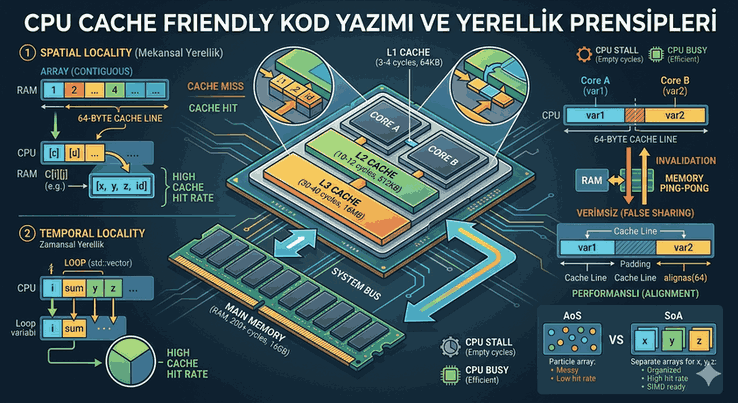
Figure 1: Writing CPU Cache Friendly Code: Spatial and Temporal Locality Principles.


1. Memory Hierarchy and the Concept of Latency

In processor architectures, data access times follow a layered structure. The L1 cache is the closest and fastest to the processor; it is followed by L2 and L3. RAM is located at the very end of this hierarchy, in the “high latency” zone.

  • L1 Cache: Access time of approximately 3-4 cycles.
  • L2 Cache: Access time of approximately 10-12 cycles.
  • L3 Cache: Access time of approximately 30-40 cycles.
  • Main Memory (RAM): Access time of 200+ cycles.

If a CPU cannot find the data it needs in the cache (Cache Miss), it remains idle for hundreds of processing cycles. This situation is called a “Stall.” The goal of cache-friendly coding is to minimize these waits.


2. Principles of Locality

There are two main principles of locality that optimize performance in memory management:

A. Temporal Locality

If a data point has been accessed, there is a high probability that the same data will be accessed again in the near future. Variables within loops or frequently used function parameters fall into this class. Cache algorithms attempt to keep the most recently used data (LRU - Least Recently Used) in the fast access layer.

B. Spatial Locality

If a data point has been accessed, there is a high probability that data located immediately adjacent to it in memory will also be accessed in a short time. The CPU does not fetch data as a single byte, but usually in 64-byte blocks (Cache Line). If your data is sequential in memory, the next data will already be fetched into the cache when you access it.


3. Cache Line Concept and Alignment

Fixed-size packets called “Cache Lines” are used when transferring data from RAM to the cache. In modern x86 and ARM architectures, this is usually 64 bytes.

Important Note: If a data structure (struct) straddles a 64-byte boundary, the processor must load two separate cache lines to read this data. This is known as a “Cache Line Split” and degrades performance. This is why aligning data structures with commands like alignas or __attribute__((aligned(64))) is critical.


4. Data Access in Matrix Operations: A Practical Analysis

The most classic example of cache-friendly coding is traversing two-dimensional arrays (matrices). In “Row-Major” languages like C++, memory is laid out row by row.

Cache-Unfriendly Approach (Column-Major)

// Inefficient: Column-based traversal
for (int j = 0; j < 1000; j++) {
    for (int i = 0; i < 1000; i++) {
        sum += matrix[i][j]; // Large jumps are made in memory at each step
    }
}

In the code above, the traversal moves to the next row at each inner loop step. If the distance between them is greater than a cache line, each access results in a “Cache Miss.”

Cache-Friendly Approach (Row-Major)

// Efficient: Row-based traversal
for (int i = 0; i < 1000; i++) {
    for (int j = 0; j < 1000; j++) {
        sum += matrix[i][j]; // Sequential memory access, high Spatial Locality
    }
}

Here, when the processor fetches the first element, it also caches the 63 bytes next to it (a total of 16 4-byte integers). The next 15 accesses are free.


5. Data-Oriented Design (DOD) and SoA vs AoS

Object-oriented programming (OOP) groups data within objects (Array of Structures - AoS). However, in performance-oriented systems, separating data based on processing requirements (Structure of Arrays - SoA) is preferred.

AoS (Array of Structures)

struct Particle {
    float x, y, z;
    int id;
    char name[32];
};
Particle particles[1000];

If you are performing a calculation using only the x, y, z coordinates, the name and id fields will also fill up the cache line. This means 80% of the cache is occupied by unnecessary data.

SoA (Structure of Arrays)

struct Particles {
    float x[1000];
    float y[1000];
    float z[1000];
};

In an SoA structure, the processor only loads the coordinate arrays that are needed. This structure is also ideal for the use of SIMD (Single Instruction Multiple Data) instruction sets (AVX, SSE).


6. Linked List vs Array (Choosing a Data Structure)

Although std::list (Linked List) is logically ordered, its nodes are scattered across different locations in memory (Heap fragmentation). Pointer chasing requires resolving a new memory address at each step and disrupts the prefetcher mechanism.

In contrast, std::vector (Array) keeps data in blocks. If you want to write cache-friendly code, using std::vector will always yield faster results, even with the cost of dynamic searching and insertion.


7. The False Sharing Phenomenon

In multi-core systems, different cores trying to modify different variables located on the same cache line leads to a performance disaster.

  • Scenario: Core A updates struct.var1; Core B updates struct.var2.
  • Problem: If both variables are within the same 64-byte cache line, when one core updates the data, the cache line in the other core is considered “invalid.” Data is constantly re-read from RAM due to Cache Coherency protocols.

Solution: Adding padding between critical variables or using alignment to move them to different cache lines.


8. Software Libraries and Tools

The following tools are industry standards for performance analysis and cache-friendly coding:

  1. Valgrind (Cachegrind): Simulates the program’s cache usage and reports Miss rates.
  2. Intel VTune Profiler: Uses processor hardware counters to identify bottlenecks at the micro-architecture level.
  3. Perf (Linux): Used to monitor CPU hardware events (cache-misses, instructions per cycle).
  4. Google Benchmark: A library used to measure the CPU time and memory performance of code snippets.

9. Advanced Techniques: Cache Blocking (Tiling)

In large datasets, if the entire data does not fit into the L3 cache, the “Tiling” technique is applied. The dataset is divided into small blocks (tiles) that fit into the cache, and operations on each block are completed before moving on to the next. This maximizes Temporal Locality.

// Blocking example for matrix multiplication (Simplified)
for (int bi = 0; bi < N; bi += BLOCK_SIZE) {
    for (int bj = 0; bj < N; bj += BLOCK_SIZE) {
        for (int bk = 0; bk < N; bk += BLOCK_SIZE) {
            // Inner loops process within the block
            for (int i = bi; i < bi + BLOCK_SIZE; i++) {
                for (int j = bj; j < bj + BLOCK_SIZE; j++) {
                    for (int k = bk; k < bk + BLOCK_SIZE; k++) {
                        C[i][j] += A[i][k] * B[k][j];
                    }
                }
            }
        }
    }
}

10. Conclusion and Recommendations

In modern hardware, performance is measured not just by algorithmic complexity ($O(n)$), but by how fast the hardware can access data. For cache-friendly coding:

  • Keep your data contiguous in memory.
  • Minimize pointer usage, and prefer arrays of value types.
  • Group frequently used data into small structures (SoA approach).
  • Be careful of False Sharing in multi-core systems.
  • Optimize critical loops according to Data Alignment.

It should be remembered that the fastest code is code where the processor does not have to wait for data. Designing software architecture with the memory hierarchy in mind from the beginning is the foundation for performance gains achieved in the later stages of a project.
#software #performance #software-performance #cpu-cache #low-level-programming #cache-friendly #memory-hierarchy #system-programming

Related Contents

Event-Driven Architecture and Asynchronous Messaging in Modern Systems

An asynchronous messaging guide for distributed system architects. Compare the flexible routing structure of RabbitMQ with the high-throughput capacity of Kafka to choose the most suitable solution for your project.
software event-driven-architecture rabbitmq apache-kafka asynchronous-messaging message-broker distributed-systems microservices system-design software-architecture backend-development scalability

Continuous CI/CD Pipeline Architecture with GitHub Actions

This article covers how to automate professional-level CI/CD processes using GitHub Actions, zero-downtime deployment strategies, rolling update implementations on Kubernetes, and technical details to consider during database migration processes.
software github github-actions ci-cd zero-downtime devops deployment-strategies kubernetes docker pipeline-optimization automation cloud-native

Performance Optimization and Latency Management in N-Tier Architecture

This guide focuses on improving the performance of N-tier structures in the .NET 8.0 architecture; it explains in technical detail how to minimize inter-layer latency using asynchronous programming, efficient data access, compile-time optimizations, and memory management techniques.

software net-8-performance n-tier-architecture software-optimization async-programming ef-core-optimization native-aot backend-development dotnet-optimization memory-management high-performance-computing

BilgeAdamBanka: Secure and Layered Banking API Architecture with .NET 8.0

Technical details and infrastructure of the 'BilgeAdamBanka' project, developed for credit card transaction management based on high-performance, scalable, and N-tier architectural principles.

software web dotnet csharp bank-api software-architecture n-tier web-development rest-api

BilgeAdamEvimiKur: Hybrid N-Tier E-Commerce Architecture with .NET 8.0 and C#

A technical document examining the architecture and technical details of 'BilgeAdamEvimiKur', a scalable and modular N-tier e-commerce platform developed using modern web technologies.

software web dotnet csharp ecommerce software-architecture n-tier web-development

Scalability in Software: High-Availability Design with Vertical and Horizontal Scaling

This article provides an in-depth technical analysis of vertical and horizontal scaling techniques, load balancing algorithms, and high-availability architectures designed to ensure uninterrupted service in modern software systems, complete with code examples.

software scalability horizontal-scaling vertical-scaling load-balancing database-sharding dev-ops

Technical Debt and Legacy Modernization: Speed, Quality, and Modernization Strategies

A comprehensive article covering the engineering details of legacy system transformation, from architectural analysis of technical debt and modernization strategies to Strangler Fig patterns, CQRS, and containerization applications.

software technical-debt legacy-modernization strangler-fig cqrs dev-ops docker kubernetes

Structural Patterns: System Modernization with Adapter and Facade

Technical analysis, structural differences, and implementation strategies of Adapter and Facade design patterns for integrating legacy systems into new architectures during the software modernization process.

software software-engineering software-performance design-patterns adapter-pattern facade-pattern legacy-code refactoring

Single Responsibility and Micro-Modules: The Engineering Cost of Decomposing Classes

An analysis of the critical engineering balance between the sustainability benefits provided by the Single Responsibility Principle (SRP) and micro-module usage versus system complexity and performance costs.

software single-responsibility dependency-management solid-principles system-design code-optimization

Repository and Unit of Work: Creating a Testable Architecture by Abstracting Data Access

A comprehensive study examining the critical roles of Repository and Unit of Work patterns in isolation at the data access layer, transaction management, and testable architecture with technical details and code examples.

software software-performance repository-pattern unit-of-work dotnetcore clean-code test-driven-development

Reflection and Meta-Programming: Runtime Code Inspection and Dynamic Object Management

A comprehensive study examining the technical depth and performance optimizations of Reflection, which analyzes type systems at runtime, and Meta-Programming techniques, which enable dynamic code generation in modern software architectures.

software software-performance dynamic-object-management meta-programming reflection dotnet code-analysis

Autonomous Systems and AI Integration: Using LLMs as an Architectural Layer and Code Analysis

A comprehensive study examining the structuring of LLMs as a cognitive architectural layer in autonomous systems, with technical depth on ReAct decision mechanisms and tool use.

software autonomous-systems ai-integration llm robotic-coding ai large-language-models python machine-learning

Open-Closed Principle: Adding New Capabilities Without Touching Existing Code (Plugin Architecture)

Open-Closed Principle (OCP): The art of gaining dynamic capabilities in software architecture through abstraction and interfaces, without modifying existing code.

software oop object-oriented-programming solid-principles open-closed-principle dependency-injection

OOP Fundamentals: Encapsulation, Inheritance, Polymorphism, and Abstraction

Object-Oriented Programming (OOP), at the heart of modern software architecture, is the most powerful way to build sustainable, scalable, and flexible systems. This article takes the four fundamental pillars of OOP—Abstraction, Encapsulation, Inheritance, and Polymorphism—beyond mere theory.

software oop encapsulation inheritance polymorphism abstraction

Observability: System Health via Logging, Metrics, and Tracing

A technical article examining deep dive techniques for logging, metric analysis, and distributed tracing to optimize system health in modern microservice architectures.

software observability microservices distributed-tracing open-telemetry sre

OAuth2, OpenID Connect, and Zero Trust: Modern Authentication and Network Security Architectures

An article examining the technical integration of the Zero Trust architecture, which adopts the 'never trust, always verify' principle in modern network security, with OAuth 2.0 authorization and OpenID Connect authentication protocols.

software oauth2 open-id-connect zero-trust jwt pkce microservices microservice-security

NoSQL Paradigm and Sharding: Partitioning Techniques for Managing Massive Datasets

This article examines sharding techniques—critical for managing massive datasets in NoSQL databases—along with architectural strategies and technical code examples.

software nosql sharding data-partitioning big-data database-architecture database-management

Migrations and Data Security: Schema Updates Without Data Loss in Production

Advanced migration strategies and technical implementation methods for performing safe schema updates on large-scale production databases without locking data or causing service interruptions.

software database-migration data-security zero-downtime database-engineering sql data-integrity

Microservices Orchestration: Containerized System Management with Kubernetes and Docker

A technical article examining containerization with Docker and end-to-end orchestration processes with Kubernetes in microservices architectures, from network configurations to security protocols.

software microservices kubernetes docker orchestration containerization dev-ops

Malware Analysis and System Defense: Coding Against Threats at the Operating System Level

A comprehensive technical article covering advanced malware analysis at the operating system kernel and memory level, cyber defense strategies, and low-level system programming techniques.

software cyber-security malware-analysis kernel-programming reverse-engineering edr-development windows-internals

Liskov Substitution: Ensuring Subclasses Do Not Break Superclass Behavior

An analysis focusing on the Liskov Substitution Principle (LSP), explaining how to structure subclasses without violating superclass contracts through technical depth, code examples, and architectural solutions.

software oop object-oriented-programming solid-principles code-quality lsp

Lazy, Eager, and Explicit Loading: Avoiding the "N+1 Problem" with Data Loading Strategies

A comprehensive guide examining the technical details and implementation methods of Lazy, Eager, and Explicit Loading strategies to optimize database performance and prevent the N+1 query problem.

software software-development software-performance nplus1-problem performance-optimization backend eager-loading lazy-loading

JIT (Just-In-Time) Compilation Process: Optimizing Code in Machine Language

A technical article examining the JIT compilation process, which is the heart of performance optimization in modern runtime architectures, covering 'Hot Spot' analysis and low-level machine code transformation mechanisms.

software software-performance jit-compilation low-level-programming v8-engine machine-code bytecode

Inversion of Control (IoC) Containers: Dependency Injection (DI) Lifetime Management

A technical analysis covering the architectural operation of Inversion of Control (IoC) containers, types of dependency injection, and the critical impact of object lifetime management (Transient, Scoped, Singleton) on software sustainability.

software software-performance dependency-injection ioc-container oop clean-code backend-development

Interface vs. Abstract Class: When to Use a Contract, When to Use a Template?

A deep technical analysis and comparison of abstract classes and interface structures in object-oriented programming, viewed from the perspectives of contract-based design and template methodology, supported by code examples.

software oop interface-vs-abstract-class solid-principles abstraction clean-code

Interface Segregation: Reducing Client Dependencies by Splitting 'Fat' Interfaces

A fundamental design principle that enables the division of large and bulky interfaces into specific, manageable parts containing only the methods clients need, in order to eliminate tight coupling between software components.

software oop dependency-management solid-principles refactoring clean-code interface-segregation

Infrastructure as Code (IaC): Infrastructure Management with Terraform and Ansible

This technical article deeply analyzes declarative and imperative infrastructure management strategies through the hybrid use of Terraform and Ansible tools in the modern DevOps ecosystem.

software infrastructure-as-code terraform ansible cloud-computing yaml dev-ops

A Deep Dive into Heap and Stack: Memory Allocation of Value and Reference Types

A technical study examining the operating mechanisms of Stack and Heap memory regions, which are the foundation of performance optimization in software architectures, the memory layout of value and reference types, and Garbage Collector processes.

software stack-and-heap memory-layout garbage-collector reference-types performance-optimization memory-management

Behind the Scenes: Memory Management and Garbage Collector Mechanisms in Python

An in-depth technical analysis of Python's CPython architecture, including reference counting, generational garbage collection (GC) cycles, and the memory pool hierarchy.

software python memory-management garbage-collection cpython memory-leak data-structures

Generic Programming: Building Flexible and Reusable Structures Without Compromising Type Safety

A generic programming architecture that allows code to work with different data types in a high-performance and flexible manner while maintaining type safety at compile time.

software generic-programming type-safety code-standard abstraction software-development algorithm-design

Garbage Collection Algorithms: Object Lifecycle and Memory Leak Analysis

Operating principles of Garbage Collection algorithms, which are the heart of memory management, stages of object lifecycle, and technical analysis methods for memory leaks that lead to critical performance losses in software systems.

software memory-management garbage-collection memory-leak object-lifecycle data-structures performance-optimization

Event Sourcing: Ensuring State Management by Storing Change History, Not Data

An architectural pattern that provides full traceability and flexible state management by recording every change in the system as an immutable stream of events instead of storing the final state of the data.

software event-sourcing cqrs microservices event-store data-integrity state-management

Change Tracking and Performance in EF Core: State Management and AsNoTracking Scenarios

A comprehensive article covering an in-depth analysis of the Change Tracking mechanism in Entity Framework Core, memory management strategies, and AsNoTracking usage scenarios for high-performance data access from a technical perspective.

software ef-core efcore dotnetcore dotnet-core orm database-optimization performance-management software-architecture

Domain-Driven Design (DDD): Putting Business Rules at the Core of Software (Value Objects vs. Entities)

Domain-Driven Design (DDD) is a methodology for building sustainable, flexible, and object-oriented architectures by focusing on business logic and the language of domain experts rather than technical details in complex software projects.

software software-performance domain-driven-design ddd entity clean-code microservices

Distributed Caching: Performance Boost at Global Scale with Redis and Memcached

A technical study examining the architectural differences, data structures, and global scaling strategies of Redis and Memcached, which are used to overcome performance bottlenecks in high-traffic systems.

software distributed-caching redis memcached data-structures backend-development microservices

DevSecOps and Secure Coding: Security Automation in SDLC Processes and ORM Security

A comprehensive study covering the DevSecOps methodology that automates security in the software development lifecycle, secure coding standards, and technical analysis of critical vulnerabilities in the ORM layer.

software dev-sec-ops secure-coding sdlc orm sql-injection cyber-security

Dependency Inversion and Abstraction Layer: Breaking Tight Coupling Between Layers

A technical article examining how the Dependency Inversion principle, through abstraction layers, breaks tight coupling between modules and builds sustainable code structures in software architecture.

software abstraction dependency-management solid-principles refactoring dependency-inversion loose-coupling

Delegates and Events: Architectural Foundations of Event-Driven Programming

An in-depth technical analysis and architectural application of delegate and event mechanisms that provide loose coupling between objects in the C# and .NET ecosystem from an event-driven programming perspective.

software software-performance event-driven-programming asynchronous-programming multicast-delegate oop software-design

Dapper vs. Entity Framework: Hybrid Approaches for High-Performance Operations

A technical review of performance-oriented and sustainable hybrid data access strategies that combine the flexibility of Entity Framework Core with the speed of Dapper in high-traffic .NET applications.

software software-performance dotnet csharp sql-server clean-code backend-development

Cross-Cutting Concerns: Logging and Security with Aspect-Oriented Programming (AOP)

An advanced programming paradigm that allows managing repetitive processes (cross-cutting concerns) such as logging, security, and error handling—which are independent of business logic—via a centralized module rather than scattering them throughout the main code.

software development software-performance aop aspect-oriented-programming cross-cutting-concerns ccc clean-code spring-aop

Deep Dive into Creational Patterns: Complex Object Construction with Abstract Factory and Builder

A comprehensive guide providing a technical analysis of the structural impact of Abstract Factory and Builder patterns—which standardize object creation processes in software architecture—on complex object hierarchies and product families.

software software-performance creational-patterns design-patterns abstract-factory builder-pattern oop

CQRS: Architecturally Separating Write and Read Operations

CQRS architecture is an advanced design pattern that provides high scalability, performance, and flexibility by separating data writing and reading responsibilities in software systems.

software cqrs microservices event-sourcing domain-driven-design ddd mediatr performance-management

Concurrency Patterns: Lock Mechanisms and Race Condition Management in Multi-thread Environments

This article is a comprehensive technical study that deeply examines concurrency patterns critical for high-performance software development, race condition risks in shared resources, and technical implementation details of modern lock mechanisms.

software software-performance concurrency multi-threading race-condition lock-mechanisms mutex semaphore

Deep Technical Topics and Strategic Approaches That Make a Difference in Senior .NET Developer Interviews

A comprehensive article examining deep technical topics such as memory management, asynchronous programming, EF Core optimizations, and microservice architectures with code examples for senior .NET developer interviews.

software dotnet csharp software-interviews garbage-collector efcore ef-core dependency-injection performance-optimization

Code First vs. Database First: Model Management in Modern and Legacy Systems

A comprehensive study examining the technical architectures of Code First and Database First approaches, ranging from modern microservices to legacy systems, including code examples and performance analyses.

software orm ef-core efcore database-first dotnet clean-code code-first

CAP Theorem and Database Selection: The Balance Between Consistency and Availability

A comprehensive study that examines the critical trade-offs between Consistency, Availability, and Partition Tolerance in distributed system design, using technical algorithms and code examples.

software cap-theorem distributed-systems database-architecture nosql consistency pacelc

Boxing and Unboxing Costs: Type Conversions in Performance-Critical Systems

A technical article examining the hardware-level costs of Boxing and Unboxing operations, IL code analysis, and solution strategies using generic structures to optimize memory management in high-performance systems.

software software-performance boxing-unboxing low-level-programming garbage-collection generic-programming memory-management

Behavioral Patterns: Encapsulating Business Logic with Command and Strategy Patterns

A technical examination of encapsulating business logic to ensure flexibility and sustainability in software architecture, focusing on the Command pattern for objectifying requests and the Strategy pattern for dynamic algorithm switching.

software software-engineering software-performance design-patterns command-pattern strategy-pattern clean-code encapsulation

Asynchronous and Parallel Programming: Non-blocking Architecture Design with Task Parallel Library (TPL)

A comprehensive article covering the mechanisms of Task Parallel Library (TPL) and async/await patterns within the .NET ecosystem, thread pool management, and technical details of high-performance, non-blocking system architectures.

software software-performance asynchronous-programming parallel-programming multithreading clean-code backend-development

API Gateway and Service Mesh: Traffic, Security, and Communication in Complex Networks (gRPC, REST)

A comprehensive technical article covering the foundations of serverless architecture, technical details of the FaaS model, and the cost-oriented scaling advantages of event-driven systems.

software serverless faas aws-lambda event-driven cloud-computing microservices