We use cookies and other tracking technologies to improve your browsing experience on our website, to show you personalized content and targeted ads, to analyze our website traffic, and to understand where our visitors are coming from.
⚠️
GDPR & Cookie Policy Notice
In accordance with data protection regulations; the use of mandatory cookies is required for the core functions of our website to operate, ensure data security, and perform analytics. If you reject the use of cookies, it is not possible to benefit from the services on our website due to technical limitations and data synchronization interruptions. You must consent to the use of cookies to access the content on our site.
Asynchronous and Parallel Programming: Non-blocking Architecture Design with Task Parallel Library (TPL)
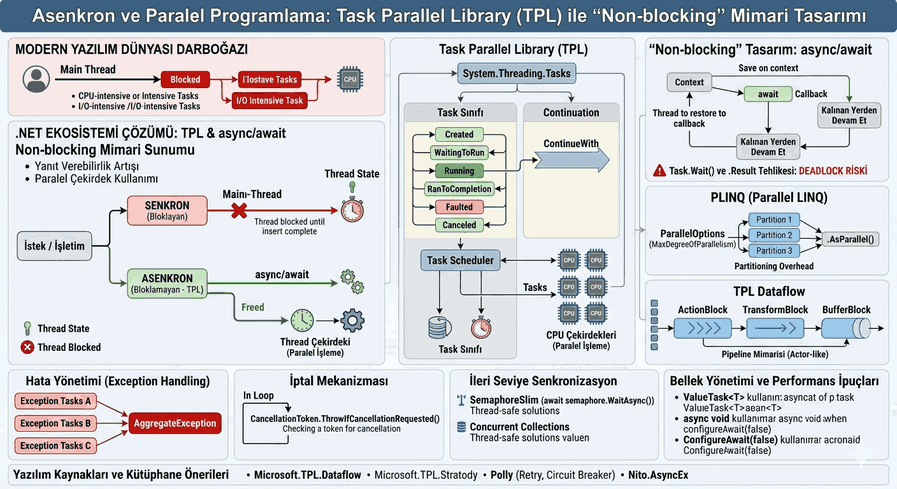
In the modern software world, especially when dealing with intensive I/O operations and complex computational algorithms, blocking the main thread is an unacceptable performance bottleneck. The .NET ecosystem offers a “Non-blocking” architecture that optimizes hardware resources by using the Task Parallel Library (TPL) and async/await patterns. This structure not only improves the application’s responsiveness but also ensures that processor cores are utilized with maximum efficiency in parallel.
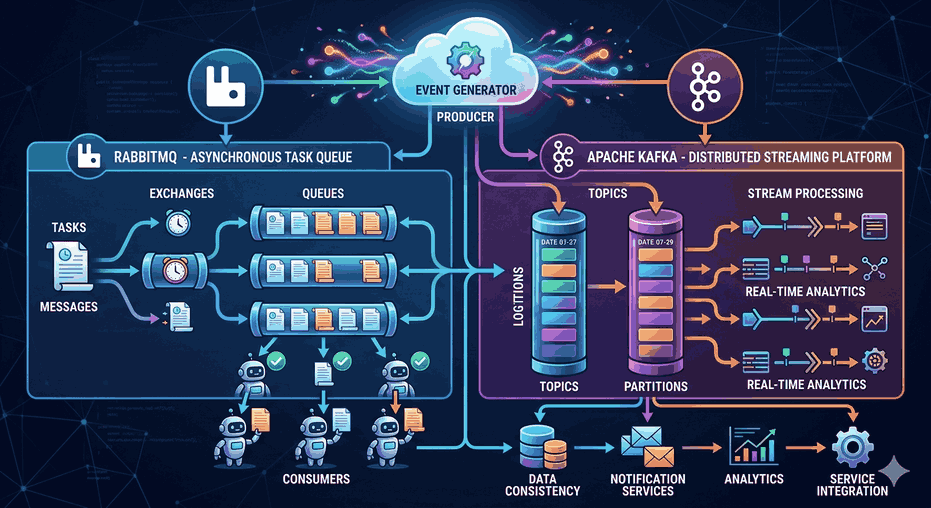
Figure 1: Asynchronous and Parallel Programming: Non-blocking Architecture Design with Task Parallel Library (TPL).
1. Conceptual Distinction Between Asynchronous and Parallel Programming
Before designing a technical architecture, it is necessary to clarify the difference between concurrency and parallelism:
Asynchronous Programming: It is the art of continuing other tasks without waiting for a process (usually I/O-based) to finish. It can also occur on a single core.
Parallel Programming: It is the execution of a workload by dividing it into parts and running them simultaneously on multiple processor cores. It is ideal for CPU-intensive (computational-heavy) operations.
2. Task Parallel Library (TPL) Architecture and the Task Class
TPL is a library that groups under the System.Threading.Tasks namespace and abstracts Thread Management. Instead of the developer directly creating and managing a Thread, it allows defining the work as a “Task” and lets the Task Scheduler decide on which core and when that task will run.
Anatomy of a Task and State Management
A Task is a “promise” structure representing the future result of an operation.
The async and await keywords provide syntactic sugar over TPL, but the mechanism working in the background is a State Machine structure. When a method reaches an await line, the current context is saved, and control is returned to the caller method. When the operation finishes, the process continues from where it left off via a callback mechanism.
Technical Note: The Danger of Task.Wait() and .Result
Waiting for an asynchronous method synchronously (.Wait() or .Result) leads to a risk of Deadlock, especially in UI and ASP.NET applications. This is why the “Async all the way” principle is critical.
4. Data Parallelism and the Parallel Class
TPL provides structures like Parallel.For and Parallel.ForEach when working on collections. These structures distribute the data across available processor cores by turning it into “partitions”.
var data = Enumerable.Range(0, 1000000).ToList();
Parallel.ForEach(data, new ParallelOptions { MaxDegreeOfParallelism = Environment.ProcessorCount }, item => {
ProcessItem(item); // Workload distributed across processor cores});
Considerations in Architecture:
MaxDegreeOfParallelism: The number of parallel threads should be limited to avoid consuming all system resources.
Partitioning Overhead: For small workloads, parallelization may result in slower performance due to thread management costs.
5. Declarative Parallelism with PLINQ (Parallel LINQ)
The .AsParallel() method is used to make LINQ queries parallel. This automatically parallelizes filtering and sorting operations on large datasets.
6. Data Flow and Pipeline Architecture: TPL Dataflow
In complex systems where data flows asynchronously from one stage to another, the System.Threading.Tasks.Dataflow library is used. This library provides an “Actor Model”-like structure and processes data in blocks.
ActionBlock: Receives data and performs an operation on it.
TransformBlock: Receives data, transforms it, and passes it to the next block.
BufferBlock: Queues the data.
7. Exception Handling and AggregateException
In asynchronous and parallel operations, errors are not thrown directly; instead, they are embedded within the Task object. If errors occur in multiple parallel operations, these errors are collected within an AggregateException.
try {
    await Task.WhenAll(task1, task2, task3);
}
catch (Exception ex) {
    // When using await, AggregateException is unwrapped and the first error is caught
    Console.WriteLine(ex.Message);
}
8. Cancellation Mechanism: CancellationToken
In a non-blocking architecture, stopping operations that are no longer needed (e.g., when the user leaves the page) is essential for resource management. TPL manages this process with CancellationTokenSource and CancellationToken structures.
publicasync Task FetchDataAsync(CancellationToken ct) {
for (int i = 0; i < 10; i++) {
ct.ThrowIfCancellationRequested(); // Cancellation checkawait Task.Delay(1000, ct);
}
}
9. Memory Management and Performance Tips
Using ValueTask: If a method returns its result immediately (synchronously) most of the time, ValueTask<T> should be preferred over Task<T> to reduce heap allocation.
Avoid async void:async void should only be used for event handlers; in all other cases, a Task should be returned. Errors in async void cannot be caught and can crash the process.
ConfigureAwait(false): If you are developing a library and there is no obligation to return to the UI thread context, use ConfigureAwait(false) to increase performance and reduce the risk of deadlock.
10. Advanced Synchronization Primitives
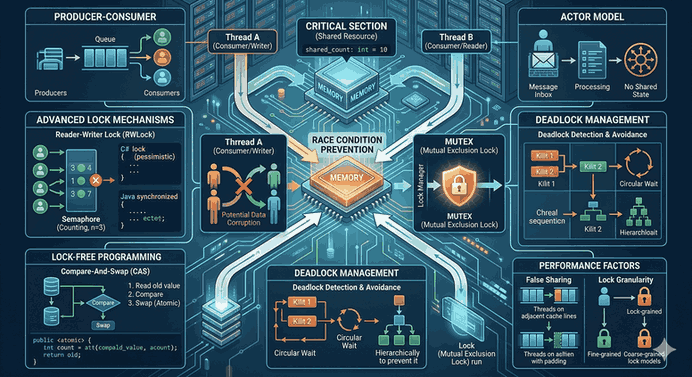
When managing access to shared resources between tasks, the classic lock structure cannot be used in asynchronous methods (within an await). Asynchronous-compatible structures should be preferred instead:
SemaphoreSlim: Allows a specific number of threads to access a resource. It offers await semaphore.WaitAsync() support.
Concurrent Collections: Thread-safe collections like ConcurrentDictionary and ConcurrentQueue eliminate the need for manual locking mechanisms.
Software Resources and Library Recommendations
Critical libraries that support non-blocking design in architecture:
Microsoft.TPL.Dataflow: For complex data processing pipelines.
Polly: To add error tolerance mechanisms such as “Retry”, “Circuit Breaker”, and “Timeout” in asynchronous operations.
Nito.AsyncEx: Helper extension methods and synchronization tools for asynchronous programming.
Conclusion
The Task Parallel Library (TPL) is the cornerstone of high-performance and scalable applications in modern .NET development. Designing a “non-blocking” architecture is not just about writing async; it is about managing the Thread Pool correctly, optimizing context switching, and structuring data flow properly. When implemented correctly, TPL enables you to build fluid and robust systems that push the limits of hardware.